Multiple Homepage Windows in Firefox
I want to have Mozilla Firefox open two homepages at the same time when it starts up and I remember that I saw an extension that could do this. I did a search on Google and, to my surprise, came across this tip by Sam Holton: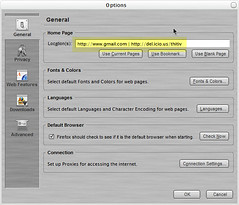
Click on the picture for enlargement
Keywords: firefox, tips
Update: Nov 20, 05: jon114k gave us another tip in the comment of this post: we can in fact use Tools -> Options -> General -> Home Page -> Use current "pages" to create the multiple homepages! I just notice this plural form. I tried it and it works!
I want to have Mozilla Firefox open two homepages at the same time when it starts up and I remember that I saw an extension that could do this. I did a search on Google and, to my surprise, came across this tip by Sam Holton:
To have multiple tabs loaded each time you start Firefox or when you press the home button, you can simply pipe delimit them in the options...if you wanted to open both Google and Digg when you open your browser, simply enter
http://www.google.com/ig | http://www.digg.com
Click on the picture for enlargement
Keywords: firefox, tips
Update: Nov 20, 05: jon114k gave us another tip in the comment of this post: we can in fact use Tools -> Options -> General -> Home Page -> Use current "pages" to create the multiple homepages! I just notice this plural form. I tried it and it works!
Comments
This is great!! Thanks for the heads-up.
John
weirdly, the Eastwood movie "Firefox" just came on Tv... :)